The Reality of Traceback: Why Hiding Your IP Is Not Enough
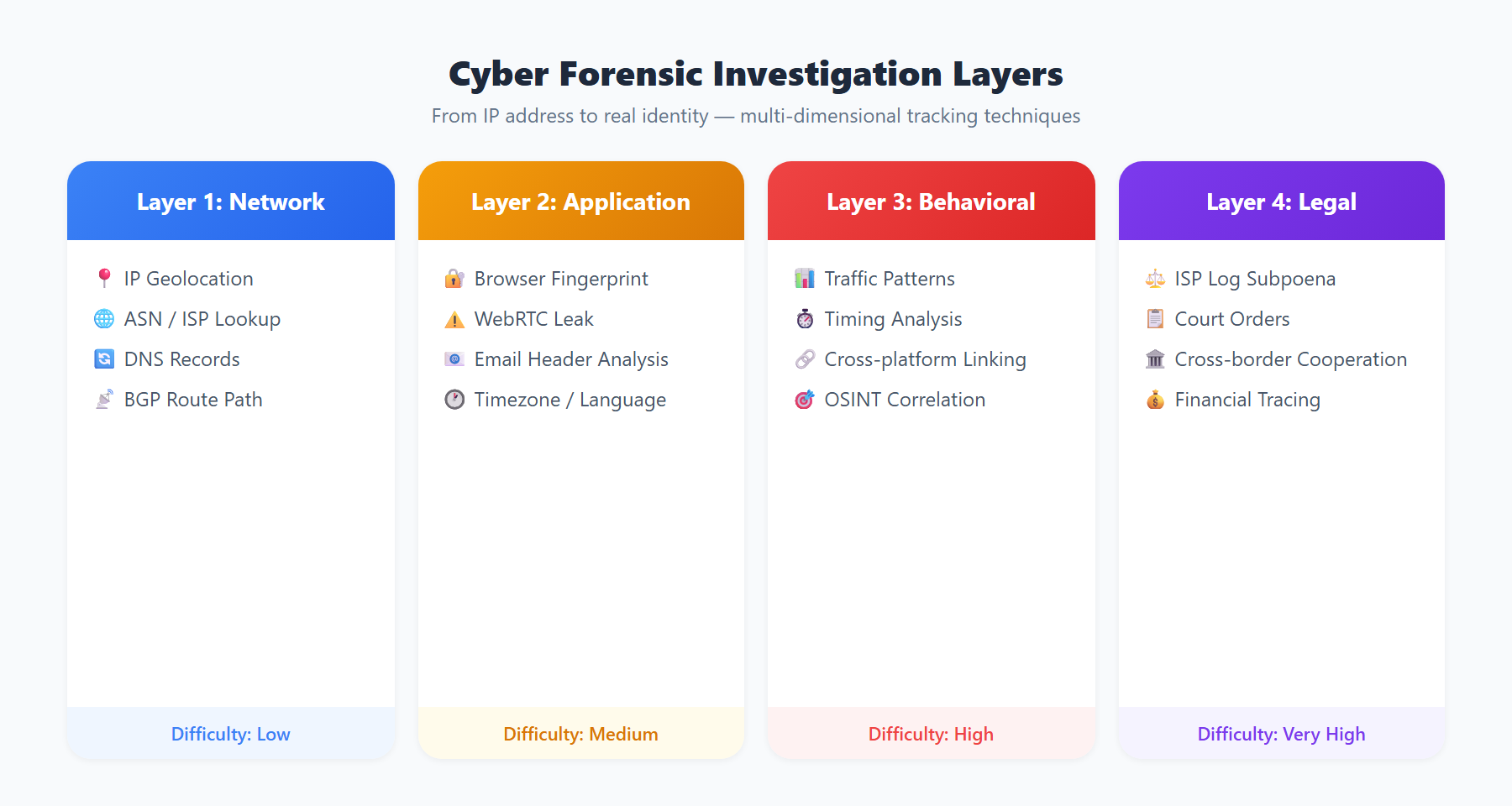
Many people believe that using a VPN or proxy server to mask their IP address guarantees complete online anonymity. This assumption is dangerously naive in the face of modern digital forensics. An IP address is merely the most superficial piece of the identity puzzle -- seasoned investigators and advanced threat analysts possess dozens of techniques capable of tracking, correlating, and ultimately confirming a user's real identity without ever relying on IP address data.
Every time you connect to the internet, your device broadcasts a rich set of digital fingerprints. These include your browser type and version, operating system details, screen resolution, installed font lists, timezone settings, language preferences, hardware acceleration characteristics, and even the behavioral patterns of your mouse movements and keystrokes. When aggregated through statistical methods, these seemingly trivial data points can generate a highly unique identifier far more accurate than an IP address alone.
Modern network forensics is a multi-layered, multi-dimensional discipline. This article provides an in-depth examination of the advanced traceback technologies that operate beyond the IP address, helping you understand the real privacy threats in the digital world and offering practical defensive recommendations. Whether you are a cybersecurity professional, a privacy advocate, or an everyday internet user, understanding these techniques is essential.
The Core Technology Stack of Network Forensics
Network forensics does not rely on a single technique. Instead, it cross-validates findings across multiple analytical methods. The following are among the most powerful approaches currently deployed:
Traffic Analysis and Timing Correlation
Traffic analysis is a surveillance technique that remains effective even when the content of communications is fully encrypted. Rather than examining packet payloads, it analyzes communication metadata -- packet sizes, transmission frequency, timing interval patterns, and flow direction.
Timing correlation attacks represent one of the most well-established techniques in traffic analysis. The underlying principle works as follows:
- Entry-exit correlation: An adversary simultaneously monitors the entry and exit nodes of a VPN or Tor network. When a user sends a request, a specific traffic pattern emerges at the entry point; milliseconds later, a highly similar pattern appears at the exit point. Statistical methods match these two patterns to link anonymous traffic back to the real user.
- Traffic fingerprinting: Different network activities -- browsing a webpage, streaming video, downloading files -- produce distinctive traffic signatures. For instance, when a specific webpage is loaded, the number, size, and order of fetched resources form that page's "traffic fingerprint." Even after encryption and multi-hop proxying, this fingerprint can be recognized.
- Long-term behavioral modeling: By collecting a user's internet usage patterns over extended periods -- when they come online, how long they stay, what categories of sites they visit -- analysts can construct behavioral models. These models are highly individualized; even when a user changes IP addresses and devices, their behavioral patterns can still be matched.
In 2013, researchers demonstrated that traffic analysis of the Tor network over a six-month period could de-anonymize users with over 80% accuracy. This finding underscored a critical truth: encryption does not equal anonymity.
Browser Fingerprinting and Device Fingerprinting
Browser fingerprinting is a technique capable of uniquely identifying users without relying on any cookies or storage mechanisms. It works by collecting the extensive array of attributes exposed by a browser and combining them into a near-unique identifier.
Key browser fingerprinting dimensions include:
- Canvas fingerprinting: The browser is instructed to render a hidden Canvas graphic, and the resulting pixel data is hashed. Because different GPUs, drivers, and rendering engines produce subtle variations, this hash is nearly unique across devices.
- WebGL fingerprinting: Similar to Canvas fingerprinting but leverages the WebGL API to extract deeper graphics hardware information, including GPU model, shader precision, and rendering capabilities.
- AudioContext fingerprinting: The Web Audio API processes a standardized audio signal. Different audio hardware and software stacks produce subtle but measurable output variations that serve as identifying markers.
- Font enumeration: Detecting the list of fonts installed on a system. The combination of operating system defaults, language packs, and user-installed fonts provides remarkably high discrimination power.
- HTTP header fingerprinting: The combination of
User-Agent,Accept-Language,Accept-Encoding, and other HTTP headers can significantly narrow the anonymity set.
The EFF's Panopticlick study found that approximately 83.6% of browsers have unique fingerprints. Even when a user hides their IP via a VPN, browser fingerprinting can track the same individual across websites and sessions. More concerning still, device fingerprinting can enhance identification through battery status APIs, sensor data (gyroscope, accelerometer), and touch-screen interaction characteristics.
Cookie Tracking and Supercookies
Traditional HTTP cookies are a well-known tracking mechanism, but modern tracking technology extends far beyond them. Even after a user clears all cookies, multiple "supercookie" techniques can persist user identifiers:
- Flash LSO (Local Shared Objects): Although Flash has been deprecated, LSOs were once among the most persistent tracking mechanisms. They were stored independently from browser cookies and survived standard browser data clearing operations.
- HSTS supercookies: By exploiting the browser's HTTP Strict Transport Security cache through carefully engineered subdomain combinations, a unique identifier can be stored in the browser. This method may remain effective even in private browsing mode.
- ETag tracking: Servers can exploit the ETag header in HTTP caching to assign unique values to each user. As long as the browser cache remains intact, the ETag continues to identify the user even after cookies are deleted.
- Browser Storage APIs:
localStorage,sessionStorage,IndexedDB, and Service Worker caches can all be leveraged to persist tracking identifiers. - Cookie syncing: Ad-tech companies share user identifiers across their networks through redirect chains. Even if a user clears cookies on one website, affiliated sites retain the correlated information.
The Evercookie project demonstrated a "zombie cookie" technique that simultaneously uses over a dozen storage mechanisms to preserve user identifiers. When any single mechanism is cleared, the remaining stores automatically restore the deleted data. While ethically and legally controversial, Evercookie clearly demonstrated that clearing cookies alone cannot guarantee privacy.
DNS Leaks and WebRTC Leaks
Even with an active VPN connection, your real network information may still leak through the following channels:
DNS leaks occur when VPN configurations are improperly set up. When your device sends DNS queries to a DNS server outside the VPN tunnel -- typically your ISP's default DNS resolver -- your browsing history becomes fully visible to the ISP and any network observers. Common leak scenarios include:
- Windows "Smart Multi-Homed Name Resolution" sending queries to multiple DNS servers simultaneously
- DNS fallback behavior when the VPN connection drops
- IPv6 DNS queries bypassing an IPv4-only VPN tunnel
- Applications with hardcoded DNS server addresses (such as
8.8.8.8) that bypass system DNS configuration
WebRTC leaks represent another serious privacy threat. WebRTC (Web Real-Time Communication) is a browser-native protocol used for video calls and peer-to-peer file transfers. The problem lies in WebRTC's ICE (Interactive Connectivity Establishment) protocol, which actively enumerates all available network interfaces, including local IP addresses and public IPs discovered via STUN servers. Even when connected through a VPN, WebRTC may expose both the real internal and external IP addresses.
Testing has shown that approximately 20%-30% of VPN users have some form of DNS or WebRTC leak without realizing it. These leaks create a false sense of security -- users believe they are protected while their traffic is effectively unshielded.
Social Engineering and Open-Source Intelligence (OSINT)
Technical methods are only part of the tracking equation. In many real-world cases, Open-Source Intelligence (OSINT) and social engineering prove to be the decisive factors in identifying individuals.
OSINT refers to the collection and analysis of data from publicly available sources. These sources include:
- Social media: Usernames, profile pictures, and bios used across different platforms may share common elements, enabling cross-platform identity correlation. Posted photos may contain geolocation tags (EXIF data), and posting times can reveal a user's timezone.
- Public code repositories: Commit histories on GitHub and GitLab contain email addresses and timestamps. Coding style, variable naming conventions, and even comment language serve as identity markers.
- Domain registration records: Even with WHOIS privacy protection, historical registration data, DNS change logs, and associated domains provide valuable investigative leads.
- Forum and darknet posts: Stylometric analysis examines writing style -- sentence structure, punctuation habits, vocabulary preferences, and grammatical error patterns -- to identify anonymous authors with surprising accuracy.
- Photo metadata: Even when geotags are stripped, other EXIF data (camera model, lens information, shutter speed, ISO settings) combined with visual clues within images (buildings, street signs, weather conditions) can be used for geolocation.
Social engineering attacks exploit human psychological vulnerabilities. A carefully crafted phishing email can trick a target into clicking a link containing a tracking pixel, which reveals their IP address, browser information, and access time. More sophisticated social engineering involves building false trust relationships, impersonating authority figures, and exploiting urgency to induce poor judgment.
In OSINT practice, investigators typically follow the "intelligence cycle" methodology: planning and direction, collection, processing and collation, analysis and production, dissemination and feedback. Each phase has dedicated tools and techniques, from Maltego's relationship mapping to Shodan's network device discovery, forming a comprehensive intelligence gathering framework.
APT Attribution in Practice: Tracing Advanced Persistent Threats
In the attribution of nation-state cyber attacks, security firms and intelligence agencies employ even more sophisticated analytical techniques. Here are several representative attribution dimensions:
Infrastructure analysis: Although APT groups frequently rotate their attack infrastructure, they often exhibit identifiable preferences in domain registration patterns, IP allocation strategies, and hosting provider selection. Analysts map the attacker's infrastructure relationships, tracking domain registration timelines, IP ownership changes, and SSL certificate associations. When multiple campaigns use domains registered by the same registrar within similar timeframes and WHOIS records share subtle common features, linkages can be established.
Code reuse and tooling signatures: Malware developed by threat actors typically contains recognizable code signatures, including:
- Artifacts left by specific compiler versions and build configurations
- Distinctive implementations or custom variants of encryption algorithms
- Command-and-control (C2) protocol communication formats
- Debug information, timestamps, and language settings embedded in the code (such as PE resource section language IDs)
- Shared code libraries and toolkits -- identical custom functions or libraries appearing across different campaigns
Operational security failures: Even the most sophisticated attackers make mistakes. Historically notable examples include:
- An attacker forgetting to activate their VPN during malware testing, causing their real IP to appear in C2 server logs
- Malicious documents retaining the creator's system username and organizational information in file metadata
- Attackers being inactive during target-timezone business hours but active during business hours in the attacker's own timezone, revealing their geographic location
- Code comments or error messages inadvertently containing text in the attacker's native language
Tactics, Techniques, and Procedures (TTP) analysis: Every APT group has its distinctive attack methodology -- from the choice of initial access vectors to lateral movement methods and data exfiltration techniques. The MITRE ATT&CK framework systematically categorizes these TTPs, enabling security analysts to match newly discovered attacks against known threat groups. One group might favor spear-phishing as an initial access vector while another prefers supply chain attacks; these preferences themselves serve as powerful attribution indicators.
Practical Defense Recommendations for Everyday Users
Confronted with such multi-dimensional tracking technologies, everyday users are not powerless. The following layered defense strategy can significantly enhance your online privacy:
Layer 1: Network-Level Protection
- Use a trustworthy VPN service: Choose a provider that has undergone independent security audits, maintains a strict no-logs policy, and supports WireGuard or OpenVPN protocols. Ensure the VPN client is configured with a Kill Switch that automatically severs your internet connection if the VPN drops, preventing traffic leaks.
- Enable DNS-over-HTTPS (DoH) or DNS-over-TLS (DoT): Encrypt your DNS queries to prevent your ISP and network intermediaries from monitoring your browsing history. Recommended encrypted DNS providers include Cloudflare (
1.1.1.1) and Quad9 (9.9.9.9). - Disable WebRTC: Turn off WebRTC in your browser settings or use browser extensions like uBlock Origin to block WebRTC IP leaks. Firefox users can navigate to
about:configand setmedia.peerconnection.enabledtofalse.
Layer 2: Browser-Level Protection
- Use a privacy-focused browser: Firefox with strict privacy settings, Tor Browser for high-sensitivity scenarios, or Brave Browser with its built-in fingerprint protection. Avoid Chrome due to its deep integration with Google's advertising ecosystem.
- Install essential privacy extensions:
uBlock Originfor ad and tracker blocking,Privacy Badgerfor intelligent tracking protection, andCanvas Blockerfor Canvas fingerprint defense. However, be aware that installing too many extensions can paradoxically make your browser fingerprint more unique. - Regularly clear browser data: Configure your browser to automatically delete cookies, cache, and site data on exit. Use containerized tabs (such as Firefox Multi-Account Containers) to isolate different online identities from one another.
Layer 3: Behavioral Protection
- Limit social media oversharing: Avoid posting photos with precise geolocation data and disable automatic geotagging. Do not reuse the same username and avatar across different platforms.
- Use separate emails and passwords: Employ different email addresses (using email aliasing features) and strong passwords for different online services. Use a password manager like KeePassXC or Bitwarden to manage your credentials securely.
- Stay vigilant against social engineering: Do not click links from unfamiliar sources, and never provide personal information without verifying the requester's identity. Maintain skepticism toward any communication that creates a sense of urgency or fear.
- Strip metadata before uploading photos: Use tools like ExifTool to remove EXIF information from photos before sharing them online, including GPS coordinates, camera model data, and shooting parameters.
It is important to emphasize that no single tool or method provides absolute anonymity. Effective privacy protection is an ongoing process that requires combining technical measures with sound security habits.
Use ipinfo.im to Assess Your Digital Exposure
Understanding the threat landscape is the first step toward defense. ipinfo.im provides users with a comprehensive suite of self-assessment tools to help you discover what information you are exposing on the internet:
- IP Address Lookup: View your current public IP address along with its associated geolocation, ISP information, and network type. The tool supports simultaneous display of both IPv4 and IPv6 addresses, helping you understand your exposure in dual-stack network environments. If you are using a VPN, you can verify whether it is correctly masking your real IP.
- DNS Leak Test: Determine whether your DNS queries are being encrypted through your VPN tunnel or exposed directly to your ISP. If the test detects a DNS leak, your browsing history may be under third-party surveillance.
- WebRTC Leak Detection: Check whether your browser is leaking your real internal and public IP addresses through the WebRTC protocol. Even with a functioning VPN connection, WebRTC leaks can expose your true location.
- Browser Fingerprint Analysis: Assess the uniqueness of your browser fingerprint and see exactly which trackable information your browser reveals, including Canvas fingerprint, WebGL fingerprint, screen parameters, and system fonts.
Regularly using these tools for self-assessment helps you identify gaps in your privacy configuration promptly. This is especially important after switching VPN providers, updating your browser, or changing network settings -- a comprehensive re-test ensures your privacy defenses remain intact.
In the digital world, the exposure you do not know about is the most dangerous. Proactively understanding your digital footprint is the first step toward genuine online privacy. Visit ipinfo.im to begin your privacy health check today.