You've carefully composed an important business email, hit send, and then hear from the recipient: "I never got it." Or maybe every alert from your monitoring system ends up in Gmail's spam folder. These problems usually aren't about the email content itself — they stem from mail server infrastructure issues like expired certificates, blacklisted IPs, or failed encryption negotiation.
This guide examines the two most critical security checkpoints in the email delivery pipeline — SSL/TLS certificates and IP blacklists (DNSBL) — and gives you actionable steps to audit and fix deliverability problems.
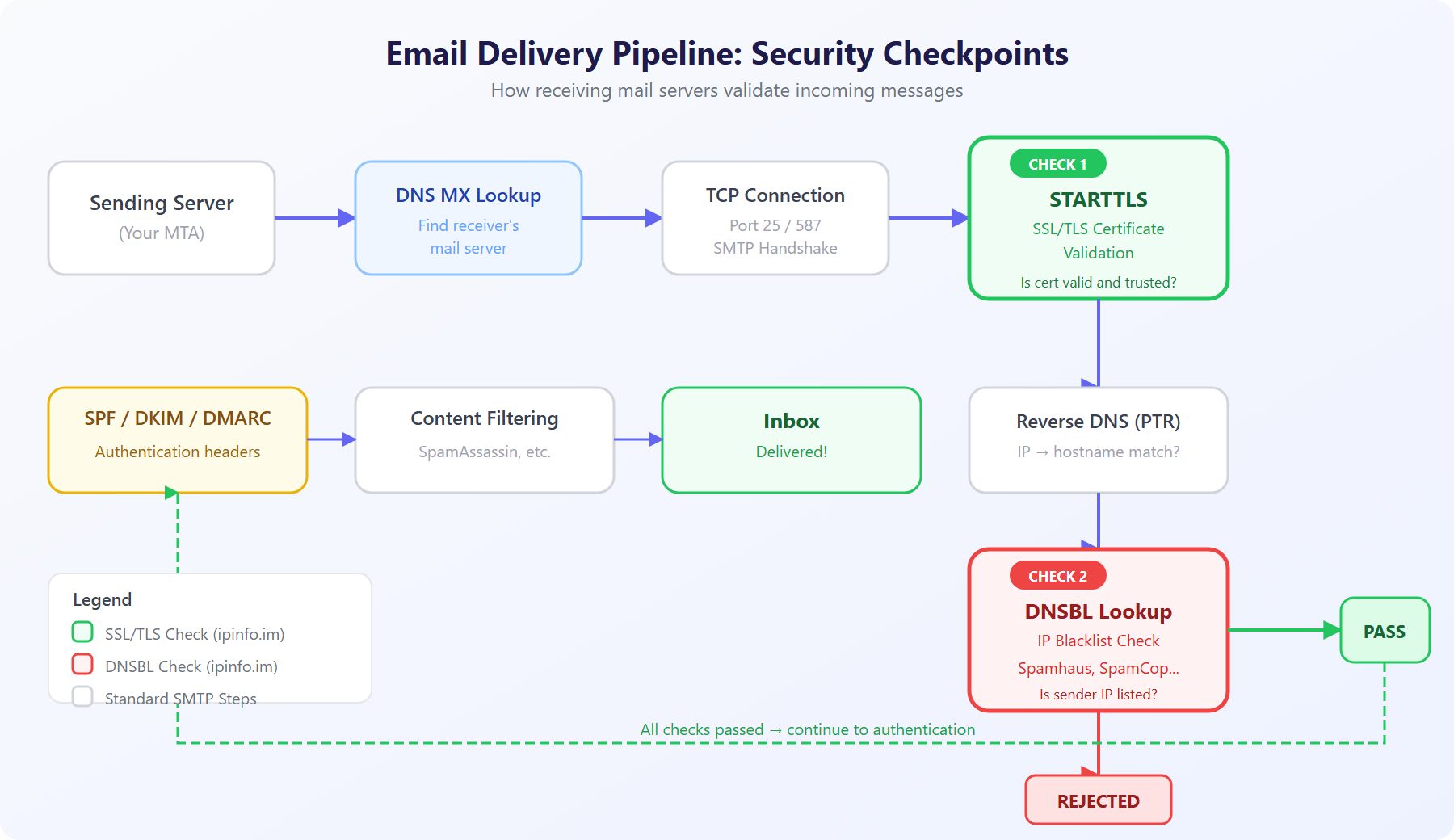
Figure 1: Security checkpoints in the email delivery pipeline — SSL/TLS validation and DNSBL queries are the two critical gates
1. How Email Actually Gets Delivered: The SMTP Pipeline
To understand email security issues, you need to understand the delivery process. When you click "Send," the following steps occur:
- DNS MX Lookup: The sending server queries the recipient domain's MX (Mail Exchange) records to find the target mail server. You can verify MX records using ipinfo.im's DNS lookup tool.
- TCP Connection: A TCP connection is established on port 25 (server-to-server) or 587 (client submission) to the receiving MTA.
- EHLO Handshake: The sender announces its capabilities via the EHLO command. The receiver responds with its supported extensions — the most critical being
STARTTLS. - STARTTLS Encryption Upgrade: If both sides support it, the plaintext SMTP connection upgrades to an encrypted TLS channel. This is where SSL/TLS certificate validation happens.
- IP Reputation Check: The receiving server checks whether the sender's IP is listed in any DNSBL blacklists. This typically occurs during the EHLO or MAIL FROM phase.
- Authentication Checks: SPF, DKIM, and DMARC records are verified.
- Content Filtering: Tools like SpamAssassin score the email content.
- Final Delivery: If all checks pass, the email reaches the inbox.
In this entire chain, Step 4 (SSL/TLS) and Step 5 (DNSBL) are the two most common failure points — and the ones most frequently overlooked by administrators.
2. SSL/TLS Certificates: The Foundation of Email Encryption
2.1 Why Does Your Mail Server Need an SSL Certificate?
SSL/TLS certificates serve two core functions in email:
- Transport Encryption: STARTTLS upgrades a plaintext SMTP connection to an encrypted channel, preventing eavesdropping and tampering during transit.
- Identity Verification: The certificate proves the mail server's identity, ensuring the sender is connecting to the legitimate server and not a man-in-the-middle attacker.
Since 2020, major email providers including Gmail, Outlook, and Yahoo have made TLS support a significant factor in email trust scoring. Mail servers without valid SSL certificates see a measurable increase in spam classification rates.
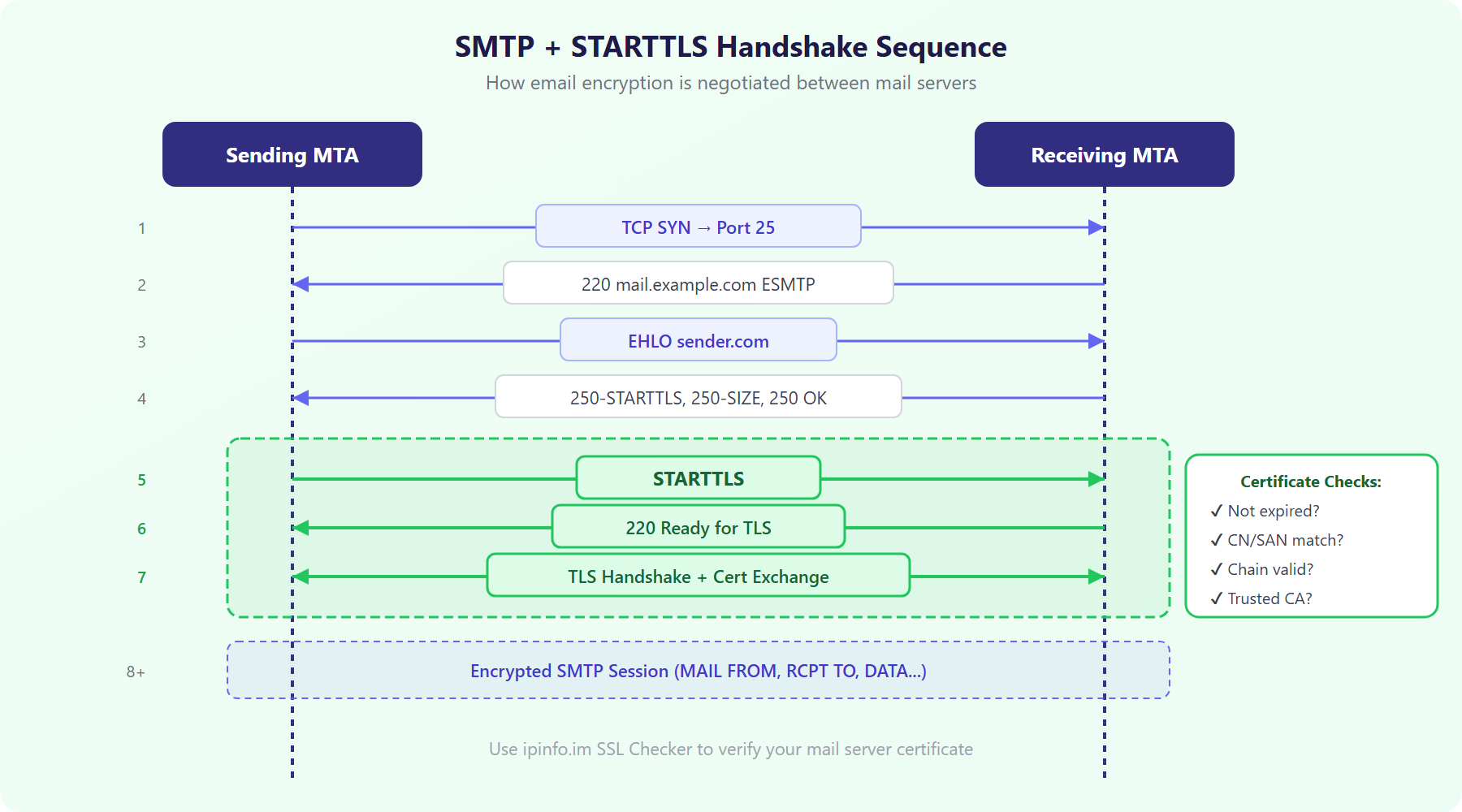
Figure 2: The complete SMTP + STARTTLS handshake sequence — Steps 5-7 are the critical TLS upgrade process
2.2 Common SSL Certificate Problems
Here are the most frequent certificate issues found on mail servers:
| Problem | Symptom | Solution |
|---|---|---|
| Expired Certificate | TLS handshake fails, connection falls back to plaintext or is rejected | Monitor expiry with SSL Certificate Checker |
| Domain Mismatch | Certificate CN/SAN doesn't include the MX hostname | Ensure certificate covers the FQDN in your MX record |
| Missing Intermediate Cert | Intermittent TLS errors on some clients | Include the full certificate chain in server config |
| Self-Signed Certificate | Rejected in strict mode, flagged as untrusted in opportunistic mode | Use Let's Encrypt for a free, trusted CA certificate |
2.3 Hands-On: Checking Your Mail Server's SSL Certificate
You can quickly verify your mail server's certificate status:
Method 1: Using ipinfo.im's SSL Checker
Visit the ipinfo.im SSL Certificate Checker, enter your mail server domain (e.g., mail.example.com), and instantly see certificate details, remaining validity, and SAN domain list.
Method 2: Command-line Verification
# Check SMTP server STARTTLS certificate
openssl s_client -connect mail.example.com:25 -starttls smtp 2>/dev/null | openssl x509 -noout -dates -subject

# Check IMAP server SSL certificate
openssl s_client -connect mail.example.com:993 2>/dev/null | openssl x509 -noout -dates -subject

# Verify certificate chain completeness
openssl s_client -connect mail.example.com:25 -starttls smtp -showcerts
3. IP Blacklists (DNSBL): The Gatekeepers of Email Reputation
3.1 How DNSBL Lookups Work
DNSBL (DNS-based Blackhole List) is a global "credit blacklist" system used by mail servers worldwide. It leverages the DNS protocol for real-time queries with an elegant mechanism:
- Reverse the sender's IP octets (e.g.,
192.168.1.100becomes100.1.168.192) - Append the DNSBL domain (e.g.,
100.1.168.192.zen.spamhaus.org) - Perform a DNS A record query
- If it returns
127.0.0.x, the IP is listed; if it returns NXDOMAIN, it's clean
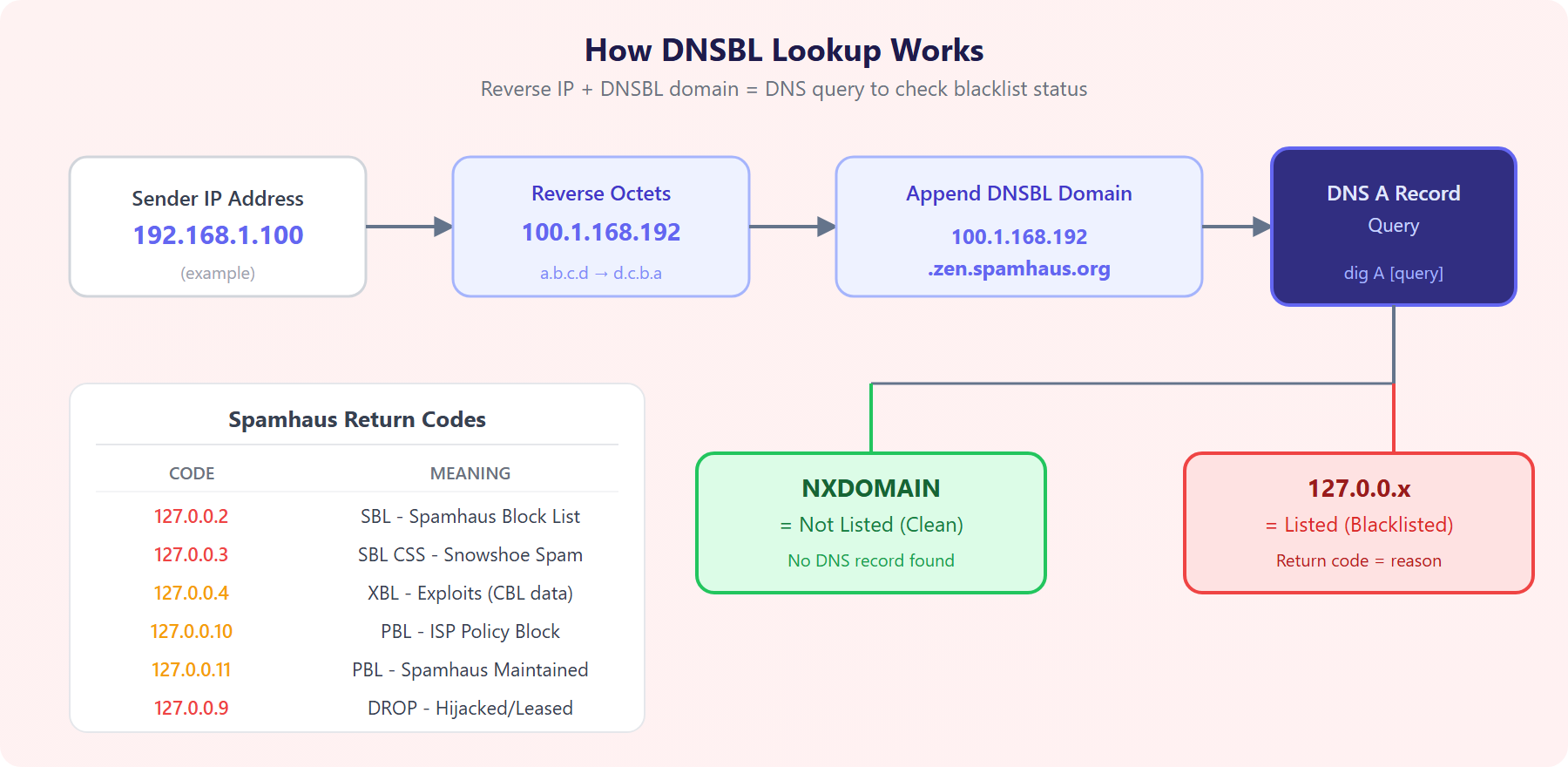
Figure 3: The DNSBL lookup process — reverse IP + append domain + DNS query, with Spamhaus return code reference
3.2 Major DNSBL Databases by Impact
Different DNSBLs carry different weight. Here are the major ones ranked by impact:
| DNSBL | Impact | Description |
|---|---|---|
| Spamhaus ZEN | Critical | Combined SBL + XBL + PBL, referenced by most mail systems globally |
| SpamCop | High | User-reported real-time blacklist with automatic expiration |
| Barracuda BRBL | High | Widely deployed on Barracuda appliances in enterprise environments |
| SORBS | Medium | Multiple sub-lists covering SMTP, SOCKS proxies, dynamic IPs, etc. |
| CBL (Abuseat) | Medium | Focuses on malware-controlled IPs (data feeds into Spamhaus XBL) |
Use ipinfo.im's IP Blacklist Checker to query all 10 major DNSBLs simultaneously and get results within 3 seconds.
3.3 Understanding Spamhaus Return Codes
Spamhaus ZEN is the most widely used DNSBL. Its return codes indicate specific listing reasons:
127.0.0.2— SBL (Spamhaus Block List): Confirmed spam source. Requires manual delisting request to Spamhaus.127.0.0.3— SBL CSS: Snowshoe spam — distributed across many IPs and domains.127.0.0.4-8— XBL (Exploits Block List): IPs controlled by malware, worms, or open proxies. Data sourced from CBL.127.0.0.9— DROP: Hijacked or leased IP ranges allocated to spam operations.127.0.0.10— PBL (ISP maintained): End-user IP ranges flagged by ISPs as not intended for direct mail sending (e.g., residential broadband).127.0.0.11— PBL (Spamhaus maintained): Dynamic/residential IP ranges proactively identified by Spamhaus.
3.4 What to Do When You're Blacklisted
If you discover your IP is blacklisted, don't panic. Follow these steps:
- Identify the listing: Use the IP Blacklist Checker to see which specific lists flagged your IP and the return codes.
- Investigate the root cause:
- XBL/CBL listing: Your server may be compromised. Check for unauthorized outbound SMTP connections.
- PBL listing: Your IP is in a dynamic allocation range. Route mail through your ISP's SMTP relay instead.
- SBL listing: Review your mailing lists and sending practices for complaints.
- Fix the problem: Clean malware, patch your server, purge invalid recipients.
- Request delisting: Visit the DNSBL's website to submit a removal request. SpamCop typically auto-expires within 24 hours; Spamhaus SBL requires a manual request.
- Monitor continuously: Check your IP status regularly to prevent relisting.
4. SSL + Blacklist: How They Compound to Kill Deliverability
Either problem alone is serious. Together, they virtually guarantee rejection. Modern mail server scoring systems are cumulative:
- Invalid SSL certificate → TLS handshake failure → Trust score penalty: -20 to -30 points
- Spamhaus-listed IP → Outright rejection or -50 to -100 points
- Missing SPF/DKIM → Additional penalties
- SpamAssassin default threshold is 5.0 — combined penalties easily exceed this
This is why we recommend making SSL certificate validation and IP blacklist checks mandatory pre-deployment items for any mail server.
5. Complete Audit Checklist: Step-by-Step Mail Server Security Review
Here's a ready-to-use audit checklist for your mail server:
A. SSL/TLS Checks
- ☐ Verify certificate isn't expired using the SSL Checker (renew at least 14 days early)
- ☐ Confirm certificate CN or SAN covers the hostname in your MX record
- ☐ Verify the certificate chain is complete (includes intermediate CA cert)
- ☐ Confirm server doesn't support deprecated TLS 1.0 / TLS 1.1
- ☐ Verify SMTP server (port 25/587) advertises STARTTLS
B. IP Reputation Checks
- ☐ Verify IP isn't listed on major DNSBLs using the IP Blacklist Checker
- ☐ Confirm IP ownership and AS reputation with ASN Lookup
- ☐ Verify PTR reverse DNS record points to your mail server hostname
- ☐ If using a cloud server, confirm the IP wasn't tainted by a previous tenant
C. Authentication Records
- ☐ Verify SPF record is published using the DNS Lookup tool
- ☐ Confirm DKIM signing is configured and passes validation
- ☐ Verify DMARC record is published (start with at least
p=nonefor monitoring)
D. Infrastructure Checks
- ☐ Check webmail security headers with the HTTP Header tool
- ☐ Confirm server isn't running an open proxy or open relay
- ☐ Verify outbound email rate limits are configured (prevents mass sending if compromised)
6. Prevention Over Cure: Long-Term Maintenance
Mail server security isn't a one-time task — it requires continuous monitoring:
- Automated certificate renewal: If using Let's Encrypt, configure certbot for automatic renewal and mail service reload. The 90-day validity period makes manual renewal error-prone.
- Regular blacklist monitoring: Check your IP weekly with the ipinfo.im Blacklist Checker, or set up automated monitoring scripts.
- Log auditing: Regularly review
/var/log/mail.log(Postfix) or/var/log/maillog(Sendmail) for TLS handshake failures and bounce records. - Dedicated sending IP: Avoid shared IPs for business email. If budget is limited, at minimum verify your shared IP isn't already tainted.
- Separate transactional and marketing email: Use different IPs and domains for order confirmations versus promotional emails. This prevents marketing complaint rates from damaging transactional email reputation.
Conclusion
Over 80% of email deliverability issues trace back to infrastructure misconfiguration. SSL/TLS certificates ensure the transport channel is secure and trusted. IP reputation via DNSBL determines whether the receiving server will even accept your connection. These two elements form the foundation of email deliverability.
ipinfo.im's SSL Certificate Checker and IP Blacklist Checker let you complete both critical audits in seconds, catching problems before they impact delivery. Combined with the DNS Lookup tool for SPF/DKIM/DMARC verification, you can perform a complete mail server security audit without leaving your browser.