Whether you run websites, APIs or global-facing services, three questions come up again and again: where the visitor is coming from, who owns the current IP address, and why a request is slow or behaving abnormally. Many teams still split those checks across multiple tools, which makes troubleshooting slower and SEO research less efficient.
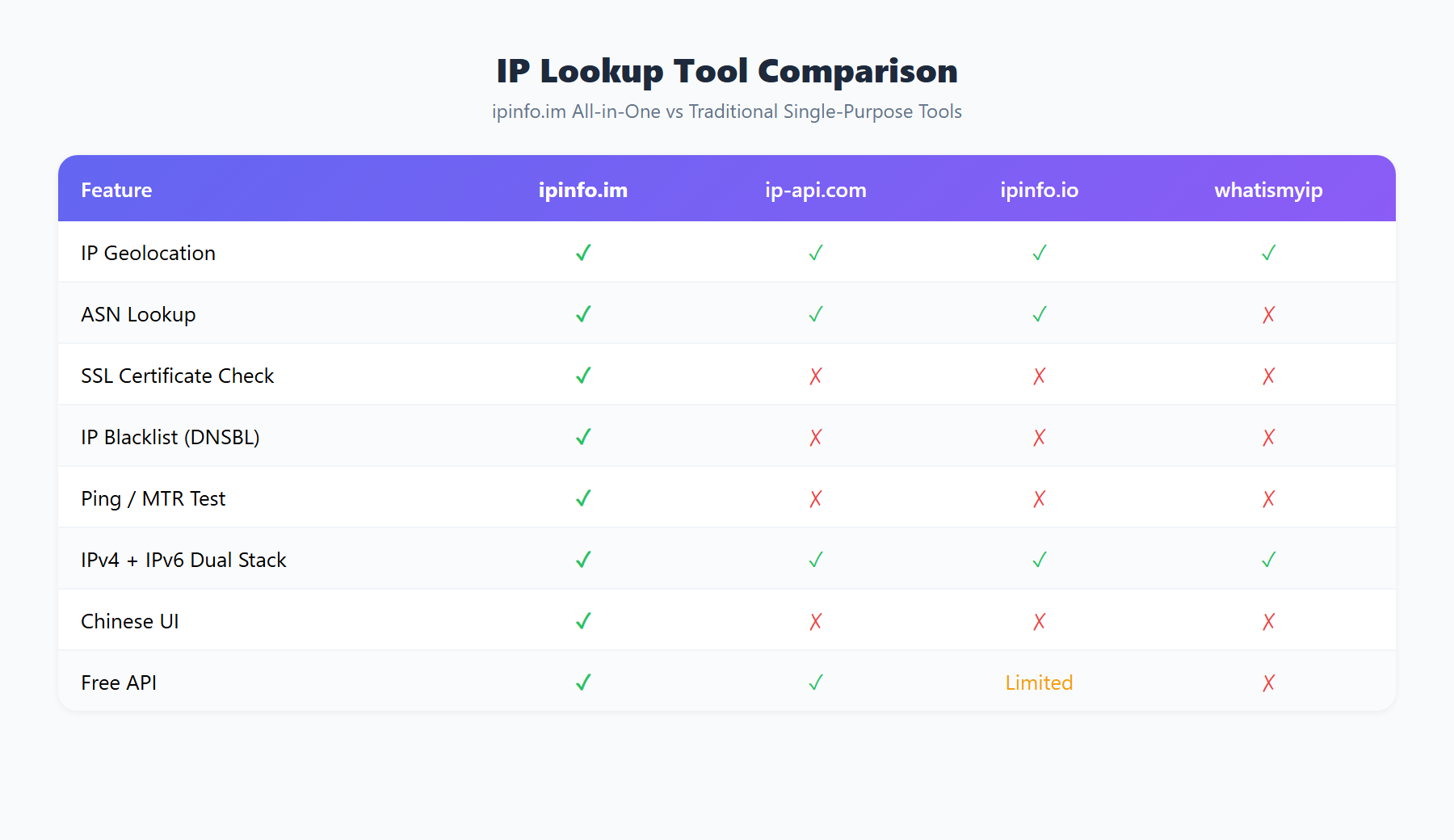
The value of ipinfo.im is that it brings together IP lookup, ASN lookup, WHOIS, CDN detection, Ping, DNS lookup, HTTP Header and Traceroute under one domain, so you can move from “something is wrong” to “this is the cause” much faster.
Why IP lookup matters for website operations and SEO
Many people think IP lookup is only about checking “what is my IP”. In practice, it is much more useful than that for both technical SEO and network operations.
- SEO geo validation: website owners can quickly verify server exit IPs, visitor regions, ASN and ISP data to understand whether crawling or delivery may be affected by geography or network policy.
- Ad traffic and risk checks: when you see unusual clicks, suspicious proxy traffic or abnormal traffic clusters, geolocation and ASN data help narrow things down quickly.
- Site incident analysis: if a page is unreachable, an API is timing out or redirects are broken, you need to examine IP, DNS, headers, CDN behavior and route quality together.
- Global deployment validation: when services are deployed across regions, IP intelligence and connectivity checks are the foundation for understanding performance differences.
1. Start with “My IP”: confirm your exit IP and geolocation
The simplest entry point is the homepage IP lookup. It is useful for three things:
- Confirming the current public IP address
- Checking estimated geolocation, ISP or provider
- Verifying whether your local network, proxy or server exit matches expectations
If you prefer command-line access, endpoints like ipinfo.im, ipinfo.im/ip and ipinfo.im/json are even more convenient for scripts, monitoring and automated diagnostics.
2. ASN lookup: identify which network a traffic source really belongs to
When logs show a group of suspicious IPs, knowing that they come from a certain country is often not enough. What matters more is which autonomous system the address belongs to, in other words the ASN.
You can use the ASN lookup tool to answer questions like:
- Does this IP belong to a cloud provider, a residential network or an enterprise network?
- Are multiple suspicious requests concentrated in one data-center ASN?
- Does the traffic pattern look like proxy traffic, bot traffic or scripted scanning?
ASN data is also valuable for SEO work. If you are investigating crawl anomalies, it helps to verify whether a target IP or service sits behind a particular hosting network, then compare that with HTTP header and DNS data to understand whether a CDN, reverse proxy or cache layer is influencing behavior.
3. WHOIS lookup: verify domain ownership and registration details
If you work with domain management, competitor research, brand monitoring or outbound link review, WHOIS lookup is essential.
Typical WHOIS use cases include:
- Checking registration status, registrar and expiration date
- Identifying whether a domain was only recently registered
- Assessing the credibility and maturity of a site
- Running basic due diligence before a link partnership or SEO collaboration
For long-term SEO, domain stability is an asset in itself. You may not need WHOIS every day, but when you need to judge whether a domain is trustworthy or why a site suddenly disappeared, it is one of the fastest places to start.
4. CDN detection: why the same domain behaves differently by region
Many cases of “it works for me, but users say it is down” turn out to be related to CDN behavior, DNS propagation or edge routing. The CDN detection tool helps you quickly see whether a domain is likely behind a CDN or distributed across multiple IPs.
This is especially useful for:
- Investigating inconsistent cache behavior for static assets
- Diagnosing regional slowness, packet loss or origin issues
- Studying the network architecture of other sites
- Understanding whether a site uses proxy, cache or edge delivery layers during technical SEO reviews
5. Ping, Traceroute, DNS and HTTP Header: real troubleshooting requires the full chain
Real network debugging is almost never about a single metric. The better approach is to combine several checks.
Ping
Use the Ping tool to test basic reachability and latency. This is the fastest first check when you need to know whether a host is reachable at all.
Traceroute
Use Traceroute to understand roughly where a route is stalling or degrading, especially for inter-network or cross-region problems.
DNS lookup
Use the DNS tool to inspect A, AAAA, MX, TXT, CNAME and NS records. It helps confirm whether a record is wrong, stale, missing or not yet propagated.
HTTP Header lookup
Use HTTP Header to inspect status codes, redirects, cache headers, server headers and CDN-related response headers. This is particularly important for technical SEO because search engines evaluate real network responses, not just visible page content.
If your question is “why is Google not indexing this page”, “why is this URL treated as a duplicate”, or “why does this address redirect incorrectly”, then headers, DNS, CDN signals and IP behavior should be analyzed together rather than in isolation.
6. Best use cases for site owners and developers
- Technical SEO troubleshooting: validate whether IPs, headers, DNS, canonicals and CDN behavior are consistent.
- Server deployment checks: confirm the actual exit IP, geolocation, provider and network layout after release.
- API testing: use JSON endpoints directly in scripts, monitoring flows and automation.
- Suspicious traffic analysis: combine ASN, WHOIS and geolocation to understand traffic sources.
- Global connectivity debugging: compare reachability and resolution results across networks and regions.
7. How to use ipinfo.im in a practical workflow
If you are a developer or operator, a clean workflow looks like this:
- Check your IP or the target IP to confirm basic network identity and location
- Use ASN lookup to identify network ownership
- If the issue is domain-related, check WHOIS and DNS
- If the issue is access or indexing behavior, inspect HTTP Header, CDN, Ping and Traceroute
- If you want to automate the process, connect to the API or JSON endpoints
FAQ
Can IP geolocation identify an exact street address?
No. In most cases IP geolocation only gives you country, region, city or ISP-level estimates. It is useful for network diagnostics and traffic analysis, not precise physical location.
Why do different tools show slightly different geolocation results?
Because data sources, refresh cycles and classification methods vary. In real troubleshooting, it is better to compare geolocation with ASN, WHOIS, DNS and HTTP header data rather than trust a single field.
Why do SEO investigations need IP and header analysis?
Because search engines index real responses. Whether a page is behind a CDN, whether a redirect is correct, whether a stale cache is being served, and whether the wrong status code is returned all directly affect indexing and canonicalization.
Conclusion
If all you need is “what is my IP”, then ipinfo.im already does the job. But if you also want to inspect geolocation, ASN, WHOIS, CDN behavior, DNS, HTTP headers and connectivity, it works much better as a unified network troubleshooting hub.
For developers, operators, site owners and technical SEO practitioners, better troubleshooting is not about collecting more tools. It is about shortening the path from symptom to cause. That is exactly where ipinfo.im is useful.