Every time you open a webpage, send a message, or stream a video, your data needs a unique numerical address to find its destination. The internet is currently in a critical transition period from IPv4 to IPv6. Understanding the differences between these two protocols matters not just for network engineers, but also for everyday users concerned about performance, privacy, and device connectivity.
Why Do We Need IPv6?
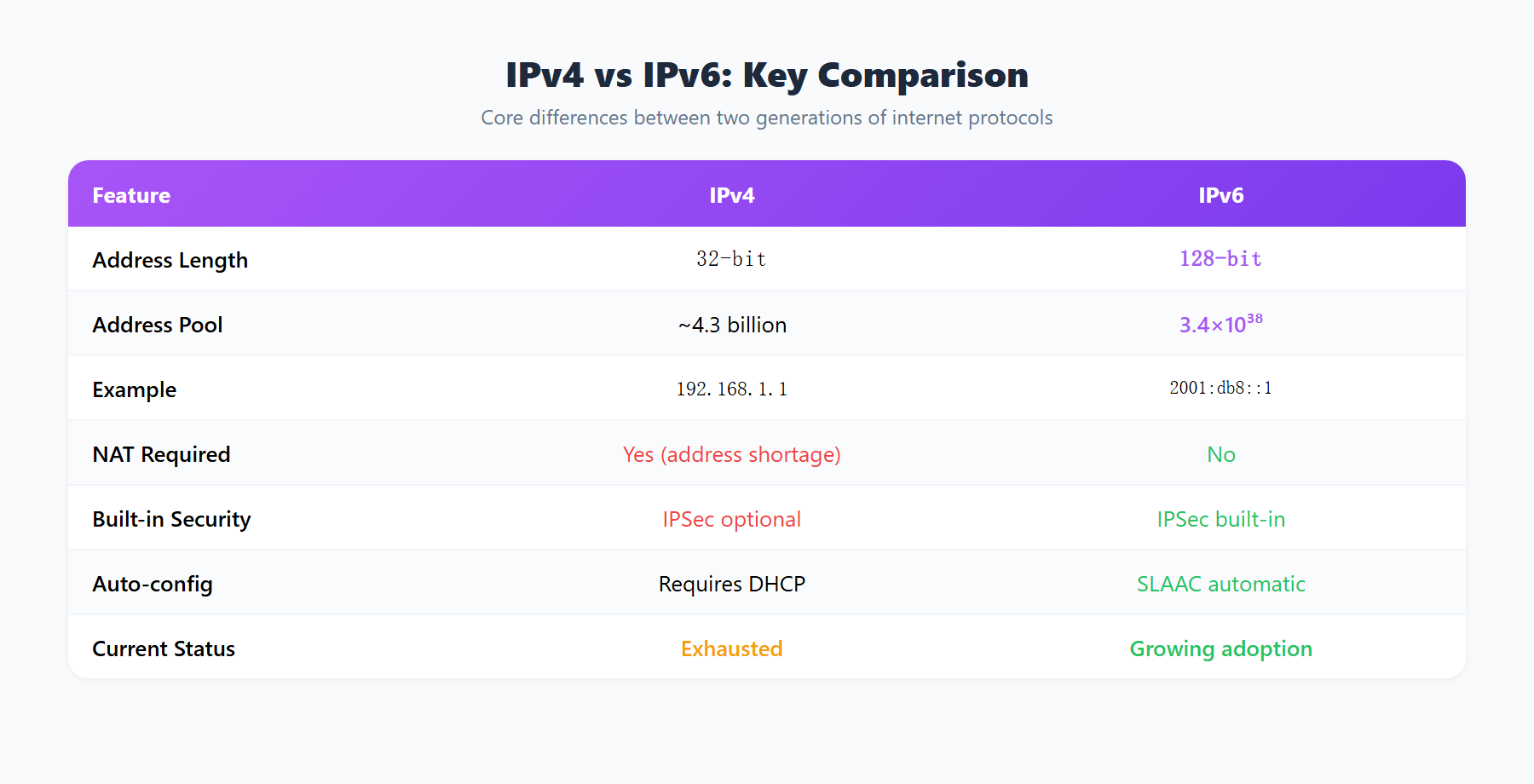
IPv4 was born in 1981 and uses 32-bit addresses, which theoretically provide approximately 4.3 billion unique addresses. In the early days of the internet, that seemed more than sufficient. However, the explosive growth of connected devices consumed addresses at an unprecedented rate. By 2011, all five Regional Internet Registries (RIRs) had announced the exhaustion of their IPv4 pools.
To cope with address scarcity, the industry adopted NAT (Network Address Translation), allowing multiple devices to share a single public IP. While NAT extended IPv4 usable lifespan, it came with significant drawbacks: it broke end-to-end connectivity, complicated P2P communications (gaming, video calls, file sharing), and made network troubleshooting more difficult.
IPv6 was designed to solve this problem at its root. Using 128-bit addresses, it provides approximately 3.4 x 1038 (340 undecillion) unique addresses, enough to assign billions of IPs to every grain of sand on Earth. Beyond addressing, IPv6 also introduces numerous protocol-level improvements.
IPv4 vs IPv6: Core Technical Comparison
| Feature | IPv4 | IPv6 |
|---|---|---|
| Address Length | 32 bits | 128 bits |
| Address Format | Dotted decimal (192.168.1.1) | Colon-separated hex (2001:0db8::1) |
| Address Space | ~4.3 billion | ~3.4 x 1038 |
| Header Size | Variable (20-60 bytes) | Fixed 40 bytes |
| NAT Required | Widely used | Not needed |
| IPSec | Optional | Mandatory in spec |
| Broadcast | Supported | Replaced by multicast |
| Auto-Configuration | Relies on DHCP | SLAAC stateless auto-config |
In terms of format, IPv4 addresses like 203.0.113.50 are concise and memorable, while IPv6 addresses like 2001:0db8:85a3:0000:0000:8a2e:0370:7334 appear far more complex. However, IPv6 allows abbreviation, so the above simplifies to 2001:db8:85a3::8a2e:370:7334.
Speed and Performance
IPv6 offers several design-level performance advantages. First, its header structure is simpler at a fixed 40 bytes versus IPv4 variable-length header. Routers skip per-packet header checksum calculation, reducing forwarding latency.
Second, IPv6 eliminates the need for NAT. In IPv4 networks, packets passing through NAT devices require address translation, adding small amounts of latency. For latency-sensitive applications like online gaming and video conferencing, these delays can accumulate to noticeable levels. IPv6 true end-to-end connectivity avoids this overhead.
In practice, however, the speed difference is usually marginal. The dominant factors affecting internet speed remain bandwidth, server load, and physical distance. In some cases IPv6 may even be slightly slower where ISPs have less mature IPv6 infrastructure. But as IPv6 infrastructure matures, this gap is closing rapidly.
Notably, major CDNs and large-scale websites (Google, Facebook, Netflix, Cloudflare) have fully embraced IPv6. For users of these platforms, IPv6 connection quality is on par with or even superior to IPv4.
Security Comparison
Security is frequently cited as an advantage of IPv6, but the reality is more nuanced.
IPSec Support: The IPv6 specification mandates IPSec support, providing end-to-end encryption and authentication. In IPv4, IPSec is optional. However, most internet traffic today is secured via TLS/HTTPS at the application layer rather than relying on IPSec.
NAT Is Not a Security Barrier: A common misconception is that IPv4 NAT provides additional security. While NAT hides internal device IPs and prevents unsolicited inbound connections, it was never designed as a security feature. A properly configured IPv6 firewall provides equal or better protection.
Neighbor Discovery vs ARP: IPv6 uses the Neighbor Discovery Protocol (NDP) to replace IPv4 ARP. NDP combined with SEND can provide stronger anti-spoofing protection. However, SEND deployment remains extremely rare, and in most networks NDP is vulnerable to similar spoofing attacks as ARP.
New Attack Surfaces: IPv6 also introduces new security challenges. While the vast 128-bit address space makes traditional network scanning impractical, attackers can exploit known address generation patterns to narrow their scope. Additionally, IPv6 extension headers can potentially be abused to evade firewall inspection.
IPv6 Deployment Status (2026)
As of 2026, global IPv6 deployment has made significant progress, though regional disparities remain:
- India: IPv6 adoption exceeds 70%, driven by carriers like Reliance Jio
- United States: Major carriers report IPv6 traffic shares exceeding 50%
- China: Under the national IPv6 Scale Deployment Action Plan, all three major carriers have completed core network IPv6 upgrades
- Europe: Germany and Belgium lead with 40-60% adoption; other countries vary widely
- Japan and South Korea: Major ISPs offer full IPv6 support with steadily rising adoption
Mobile networks represent the fastest-growing area of IPv6 deployment. Because 4G/5G standards natively support IPv6, new mobile network deployments typically enable it by default. Many mobile users may already be using IPv6 without realizing it.
What It Means for Everyday Users
For the vast majority of everyday users, the IPv4-to-IPv6 transition is essentially invisible. This is thanks to Dual Stack technology, where devices run both protocols simultaneously and the OS automatically selects the optimal one.
Gaming: IPv6 can deliver noticeable improvements for online gaming. By eliminating NAT port restrictions, P2P connections become smoother. NAT type issues (Strict, Moderate, Open) simply do not exist in IPv6 environments, which is a significant win for console gamers.
Smart Home: IPv6 vast address space means every smart device in your home can have its own globally unique IP address, simplifying direct device-to-device communication and paving the way for seamless IoT connectivity.
Privacy Considerations: IPv6 SLAAC mechanism originally used the device MAC address to generate IPv6 addresses (EUI-64 format), meaning devices could be tracked across networks. Modern operating systems introduced Privacy Extensions, periodically generating random temporary IPv6 addresses for outbound communication. Windows, macOS, iOS, and Android all enable this by default.
Connection Diagnostics: When troubleshooting network issues, knowing whether you are using IPv4 or IPv6 is important. Some websites or services may only be reachable via one protocol, and knowing your connection type helps you quickly pinpoint problems.
How to Check Your IPv6 Support
Method 1: Use ipinfo.im
Visit ipinfo.im, and the page will automatically display your public IP address. If both an IPv4 and an IPv6 address are shown, your network supports dual stack. The dual-stack detection feature intelligently identifies and separately displays your IPv4 and IPv6 addresses, giving you an at-a-glance view of your connectivity status.
Method 2: Operating System Commands
- Windows: Open Command Prompt and type
ipconfig. Look for an IPv6 Address entry under your network adapter - macOS/Linux: In the terminal, run
ifconfigorip addrand look for addresses starting withinet6(excluding link-local addresses beginning withfe80::)
Method 3: Router Admin Panel
Log into your router administration page and check the WAN settings for IPv6 connection information. If your ISP supports IPv6, you will typically see an assigned IPv6 prefix here. Some routers may require manually enabling IPv6 support.
If you discover that you only have an IPv4 address, do not worry. Virtually all internet services still support IPv4 access. IPv6 is the future direction, but IPv4 will continue to function for a considerable time to come. When your ISP is ready, IPv6 will be enabled naturally and seamlessly.