In today's interconnected world, every time you stream a video on your phone, send an email from your laptop, or watch a movie on your smart TV, your device uses a digital label known as an IP Address (Internet Protocol Address) to communicate with servers across the globe.
IP Address: The Internet's "House Number"
Simply put, an IP address acts like your home's "door number" or a package's "shipping address." Without this address, data packets on the internet wouldn't know where to be delivered, and you wouldn't be able to load any web pages.
The most common format we use today is the IPv4 address, which looks something like this: 192.168.1.1 or 8.8.8.8. However, due to the explosive growth in the number of global devices, the roughly 4.3 billion available IPv4 addresses have been exhausted. Because of this, the next generation, IPv6, is being widely adopted. Its format looks more like 2001:0db8:85a3:0000:0000:8a2e:0370:7334, providing enough addresses to assign one to every grain of sand on Earth.
Public IP vs. Private IP
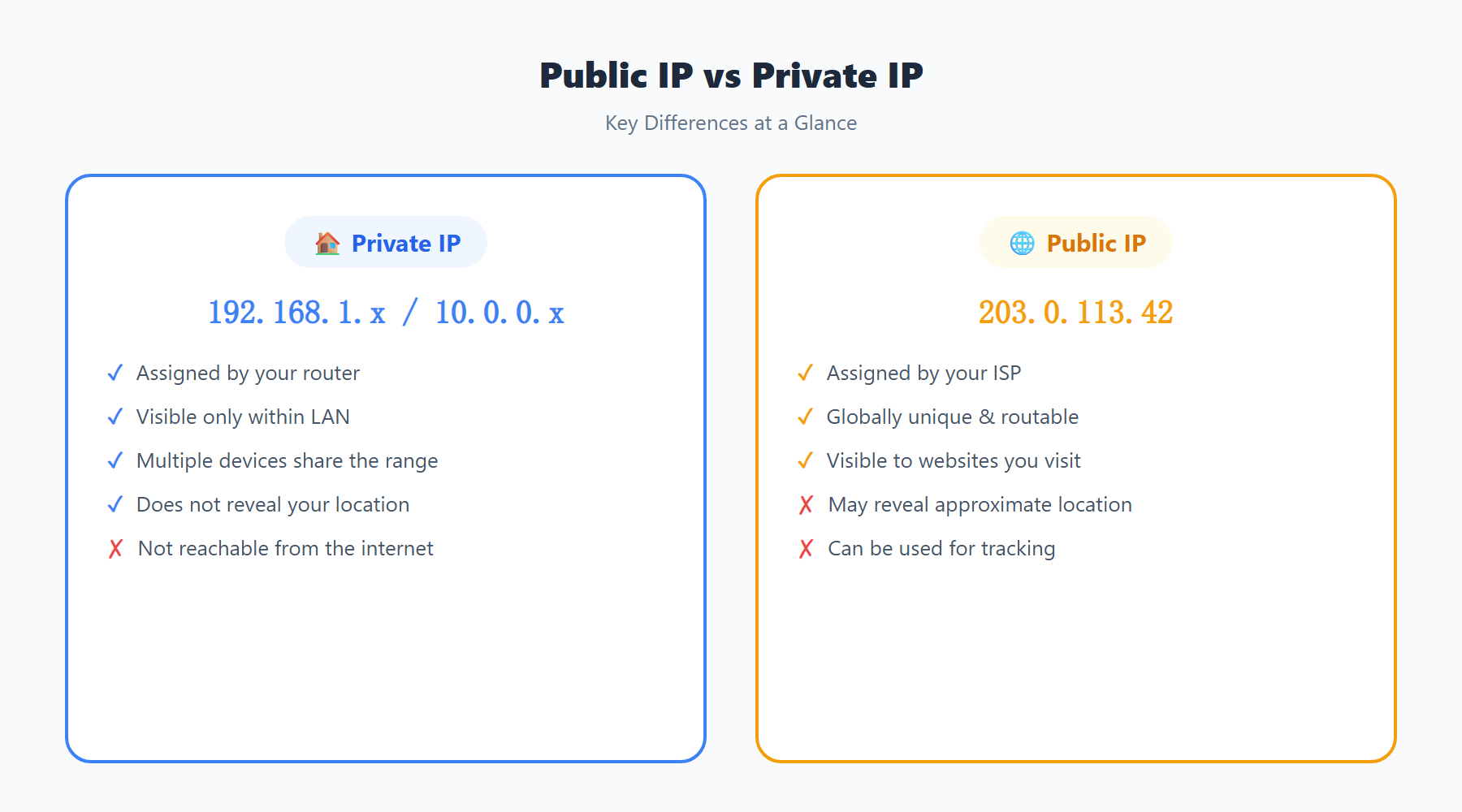
Before understanding your IP, it's crucial to differentiate between "public" and "private" networks, as they play completely different roles.
Private IP (Local IP)
This is the local address your home router assigns to your personal devices (like your phone, laptop, or smart home gadgets). These addresses are only valid within your home Wi-Fi network. Common private IPs usually start with 192.168.x.x, 10.x.x.x, or 172.16.x.x. The external internet cannot access your devices directly using these internal addresses.
Public IP (External IP)
This is the unique address assigned by your Internet Service Provider (ISP, such as Comcast, AT&T, or Verizon) to your modem/router, facing the entire internet. When you visit websites like ipinfo.im, the server sees this public IP.
Think of it like this: you live in a specific room (private IP) within a large office building (public IP). People outside can only send mail to the building's front desk. The front desk (your router) then distributes the mail to your specific desk based on your room number.
What Can Be Discovered From an IP Address?
Many people worry that exposing their IP address poses a severe security risk. In reality, while your public IP is exposed, the information it can reveal is limited:
- Geolocation (Approximate): It can roughly identify your country, state/province, and sometimes your city. However, it usually cannot pinpoint your exact street or house address.
- ISP Information: The name of the company providing your internet connection can be easily found.
- Network Type: It can indicate whether the IP belongs to a residential broadband connection, a data center, or a proxy node.
If someone wanted to find your real name or exact address using just your IP, they would need extremely high administrative privileges and would have to request the backend records from your ISP. In most countries, this requires a subpoena from law enforcement and cannot be done by ordinary individuals or websites.
How to Protect My Real IP Privacy?
If you are browsing on public Wi-Fi, handling sensitive information, or simply don't want your browsing habits and approximate location tracked by websites, hiding your real public IP is highly necessary.
- Use a Proxy Server or Virtual Private Network (VPN): These services create an encrypted middleman between your device and the target website. The website will only see the IP of the middleman server, unable to determine your real origin.
- Use Proxy Browsing Features: Tools like Tor (The Onion Router) bounce your traffic across multiple random nodes, making tracking your real IP nearly impossible.
- Restart Your Modem: If you are using a dynamic IP (which is the case for most residential connections), simply unplugging your router for a few minutes and plugging it back in will usually prompt your ISP to assign you a new public IP.
Next time you need to quickly check your current public identity, geographical location, or whether your proxy tool is working, just open ipinfo.im in your browser. We'll return the most accurate information to you in milliseconds.
How IP Addresses Are Assigned: From IANA to Your Device
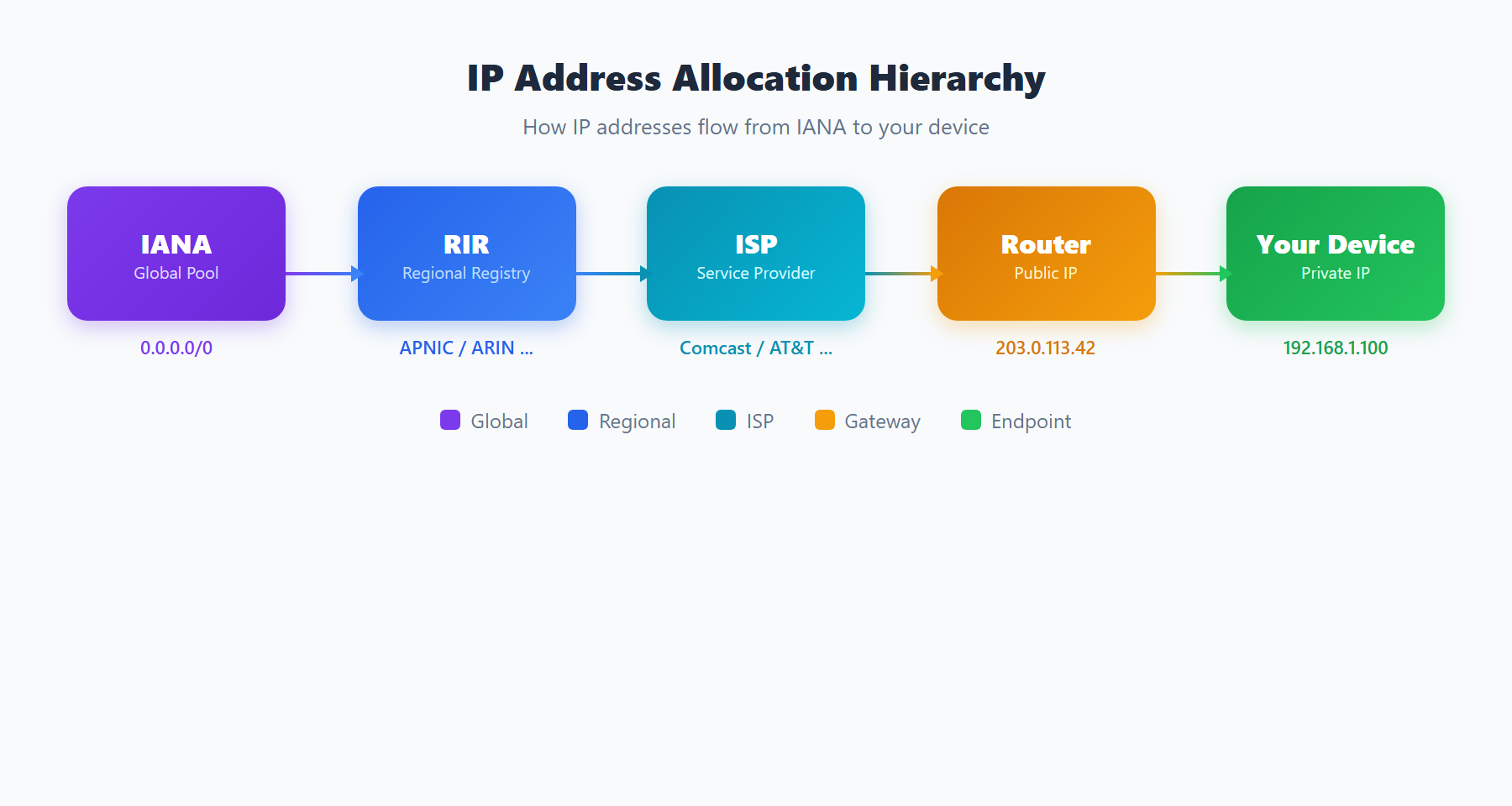
The global IP address allocation follows a hierarchical structure:
- IANA (Internet Assigned Numbers Authority): The top-level authority that manages the global pool of IP addresses and delegates large blocks to Regional Internet Registries.
- RIRs (Regional Internet Registries): Five organizations manage IP allocation for different regions: ARIN (North America), RIPE NCC (Europe/Middle East), APNIC (Asia-Pacific), LACNIC (Latin America), and AFRINIC (Africa). They allocate IP blocks to ISPs and large organizations.
- ISPs (Internet Service Providers): Your ISP receives IP blocks from the relevant RIR and assigns individual addresses to subscribers through DHCP (Dynamic Host Configuration Protocol) or static assignment.
- Your Router: Your ISP assigns a public IP to your router. The router then uses NAT and its own DHCP server to assign private IP addresses (like
192.168.1.x) to each device on your home network.
This hierarchical system is why IP geolocation works — the allocation records maintained by RIRs map IP blocks to geographic regions and organizations, allowing services like ipinfo.im to determine your approximate location from your IP address.
Static vs Dynamic IP Addresses
Most residential internet connections use dynamic IP addresses, which are temporarily assigned by your ISP's DHCP server and may change periodically:
- Dynamic IP: Assigned automatically via DHCP. Your IP may change when your router restarts, when the DHCP lease expires (typically every 24 hours to 7 days), or during ISP maintenance. Dynamic IPs are standard for residential connections because they allow ISPs to efficiently manage a limited pool of addresses among more subscribers than they have addresses.
- Static IP: Permanently assigned and does not change. Required for hosting servers, running VPNs, setting up remote access, or any service that needs a consistent address. Static IPs typically cost extra from your ISP and are standard for business connections.
To determine whether your IP is static or dynamic, check your IP on ipinfo.im on several different days. If the address changes, you have a dynamic IP. You can also check your router's WAN settings — if it uses DHCP to obtain its address, it is dynamic.
IP Geolocation: How Accurate Is the Location Shown?
When you check your IP on ipinfo.im, the location shown represents an approximation based on IP geolocation databases. These databases are compiled from multiple sources including RIR allocation records, ISP network infrastructure data, user-contributed location information, and active network measurements.
The accuracy varies by level: country identification is typically 99% accurate, state or region is around 80-90%, and city-level accuracy ranges from 50-80% depending on the IP type. The location shown usually corresponds to your ISP's nearest point of presence rather than your exact physical address. Mobile IPs and satellite internet connections tend to be the least accurate because the network infrastructure serving you may be located in a different city than where you are physically located.
Your IP and Online Security Threats
Your IP address can be leveraged in several types of attacks if exposed to malicious actors:
- DDoS Attacks: Distributed Denial of Service attacks flood your IP with traffic, overwhelming your connection and making internet access impossible. Gamers and streamers are frequent targets because their IPs can be discovered through game servers or peer-to-peer voice chat.
- Port Scanning: Attackers scan your IP for open ports to identify running services that might be vulnerable. An exposed SSH server, unpatched web server, or misconfigured IoT device can provide an entry point into your network.
- Brute Force Attacks: If you have any services exposed to the internet (RDP, SSH, web applications), attackers will attempt to guess credentials through automated brute force attacks targeting your IP.
- Social Engineering: With your IP address and ISP information, an attacker can potentially contact your ISP to attempt social engineering attacks, or use the geographic information for targeted phishing campaigns.
How to Check Your IP Address Using ipinfo.im
Checking your IP information on ipinfo.im is instant and requires no registration or software installation. Simply visit the homepage, and the tool automatically detects and displays your connection details. Each field provides specific intelligence about your network connection:
- IP Address: Your public IPv4 and/or IPv6 address as seen by external servers. If you are behind a VPN, this shows the VPN server's IP.
- ISP: The Internet Service Provider operating the network your IP belongs to. For VPN users, this shows the VPN provider's hosting company.
- Location: The approximate geographic location associated with your IP, derived from geolocation databases. Accuracy varies as described above.
- ASN: The Autonomous System Number identifying the network operator. This technical identifier is used by security researchers and network engineers to understand routing and network ownership.
Regularly checking this information helps you verify that your privacy tools are working correctly, understand what websites can learn about you from your IP alone, and detect any unexpected changes to your network configuration.
Quick IP Check Tips
For the fastest and most reliable way to check your IP address, simply visit ipinfo.im. The tool instantly detects and displays your public IPv4 and IPv6 addresses along with geolocation data, ISP information, and network details — all without requiring any sign-up or software installation. Bookmark it for quick access whenever you need to verify your connection status or confirm that your VPN is working correctly.