What Is an IP Address and Why Does It Matter?
An IP (Internet Protocol) address is a numerical label assigned to every device connected to a computer network that uses the Internet Protocol for communication. Think of it as your device's mailing address on the internet — without it, data packets would have no way to find their destination or return to you with the information you requested.
There are two versions of IP addresses in active use today. IPv4 addresses consist of four numbers separated by dots (e.g., 203.0.113.45), providing approximately 4.3 billion unique addresses. IPv6 addresses use eight groups of hexadecimal digits separated by colons (e.g., 2001:0db8:85a3::8a2e:0370:7334), providing a virtually unlimited address space of 340 undecillion addresses. The global internet is gradually transitioning from IPv4 to IPv6 as the former's address space has been fully exhausted.
Every time you visit a website, send an email, or stream a video, your IP address is transmitted to the servers you communicate with. This is a fundamental requirement of internet communication — there is no way to use the internet without exposing an IP address to the services you access. Understanding what your IP reveals and how to control that exposure is therefore essential to digital literacy.
What Exactly Does Your IP Info Reveal?
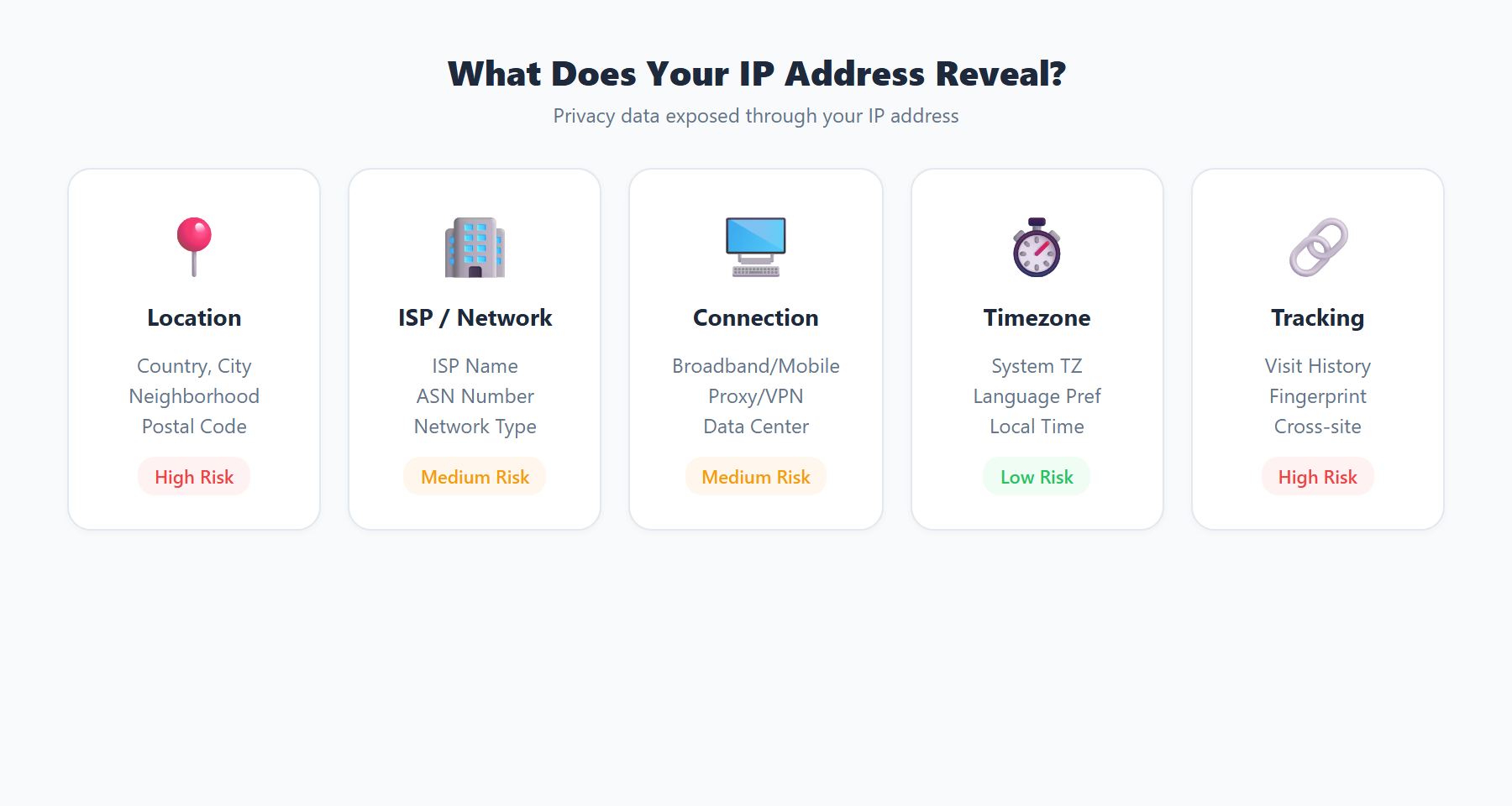
When someone obtains your IP address, they can derive a surprising amount of information from it, even without any hacking or special access. The data associated with an IP address includes:
- Geographic Location: IP geolocation databases map IP addresses to approximate physical locations. Accuracy varies by level — country identification is typically 99% accurate, region or state is around 85% accurate, and city-level geolocation ranges from 50% to 80% accurate depending on the IP type and database quality. The location shown represents where your ISP's routing equipment is located, which may be the nearest city rather than your exact street address.
- Internet Service Provider (ISP): Your IP address directly identifies which ISP provides your internet connection. This reveals whether you are using a residential broadband connection, a mobile cellular network, a corporate enterprise network, or a datacenter/cloud provider (which often indicates VPN or proxy usage).
- Autonomous System Number (ASN): Every IP belongs to an ASN, which identifies the network operator. ASN data reveals the organizational ownership of the IP range, routing relationships, and network size. Security researchers use ASN data to identify suspicious traffic patterns.
- Connection Type: Advanced IP intelligence can classify connections as residential, business, hosting/datacenter, mobile, or educational. This classification is used by fraud detection systems, content delivery networks, and advertising platforms to make decisions about how to handle your traffic.
- Proxy and VPN Detection: Specialized databases maintain lists of known VPN exit nodes, proxy servers, and Tor relay IPs. Services can check your IP against these databases to determine whether you are using anonymization tools.
IP Geolocation: How Accurate Is It Really?
IP geolocation is one of the most commonly misunderstood aspects of IP intelligence. Movies and television shows often portray IP tracking as pinpointing an exact home address, but the reality is more nuanced.
Geolocation databases like MaxMind GeoLite2, IP2Location, and DB-IP build their databases through multiple data sources: regional internet registry (RIR) allocation records, ISP network topology information, user-submitted location data, Wi-Fi access point mapping, and active network measurement probes. The accuracy depends heavily on the IP type:
- Residential ISP IPs: Typically geolocate to the correct city in 60-80% of cases. The mapped location usually corresponds to the ISP's local point of presence (PoP) or distribution hub rather than the subscriber's physical address.
- Mobile IPs: Less accurate due to carrier-grade NAT (CGNAT), where thousands of mobile users share a single public IP. The geolocation often points to the mobile carrier's gateway in a regional hub city.
- Datacenter and Cloud IPs: Highly accurate for identifying the data center facility location, but this reveals the server's location rather than the user's location when VPN or proxy services are involved.
- Satellite Internet: Notoriously inaccurate for geolocation because the ground station may be hundreds of kilometers from the subscriber's actual location.
You can check the geolocation accuracy for your own IP by visiting ipinfo.im and comparing the displayed location with your actual physical location. This comparison helps you understand exactly how much location information your IP address reveals to the websites you visit.
Your IP and Online Advertising
The advertising technology industry is one of the largest consumers of IP intelligence data. Ad networks and demand-side platforms use IP addresses for several purposes that directly affect your online experience:
- Geographic Targeting: Advertisers serve different ads based on your IP-derived location. A user in New York sees local restaurant ads while a user in London sees UK-specific promotions. This targeting operates at country, region, and city levels.
- Frequency Capping: Ad platforms use IP addresses to limit how often you see the same advertisement, even across different websites within the same ad network.
- Fraud Detection: Ad networks analyze IP patterns to detect click fraud, bot traffic, and invalid impressions. Multiple clicks from the same IP in rapid succession are automatically flagged and filtered.
- Cross-Device Linking: When multiple devices share the same public IP (as in a household), ad platforms may link their browsing profiles together, creating a shared household advertising profile that affects what ads all family members see.
IP Reputation and Blacklists
Your IP address carries a reputation score that affects your ability to send emails, access certain websites, and complete online transactions. IP reputation is determined by the historical behavior associated with that IP address:
- Email Blacklists (DNSBL): Services like Spamhaus, Barracuda, and SpamCop maintain real-time lists of IP addresses known to send spam. If your IP is on one of these lists — which can happen if a previous user of your dynamically assigned IP sent spam — your emails may be silently rejected or routed to spam folders.
- Web Application Firewalls: Many websites use IP reputation databases to block or challenge requests from IPs associated with hacking attempts, web scraping, or DDoS attacks. If your shared IP has been used for such activities, you may encounter more CAPTCHAs or access denials.
- Financial Services: Banks and payment processors check IP reputation as part of their fraud scoring. A transaction from an IP with poor reputation may trigger additional verification requirements or be blocked entirely.
Because most residential internet users receive dynamically assigned IP addresses that change periodically, you may inherit the reputation of a previous user. Checking your current IP reputation through tools available on ipinfo.im can help you understand whether your IP might be causing deliverability or access problems.
How Websites Use Your IP Beyond Geolocation
Your IP address serves many purposes beyond simple location identification in the modern web infrastructure:
- Rate Limiting: APIs and web services limit the number of requests from a single IP address within a time window. This prevents abuse but also affects legitimate power users and anyone behind CGNAT sharing an IP with thousands of others.
- Access Control: Many corporate applications restrict access to specific IP ranges. Government services, banking portals, and enterprise systems use IP-based allowlisting as a security layer.
- Content Localization: Websites automatically serve content in your local language, display prices in your local currency, and show region-specific content based on your IP geolocation — often before you have any opportunity to set your preferences manually.
- Legal Compliance: Services like online gambling platforms, streaming services, and cryptocurrency exchanges use IP geolocation to enforce geographic licensing restrictions and comply with local regulations.
- Bot Detection: Security systems analyze IP metadata, including whether the IP belongs to a residential ISP or a datacenter, to score the likelihood that a visitor is a human user versus an automated bot.
Why You Should Care About Your IP Privacy
Given everything your IP address reveals, there are several compelling reasons to actively manage your IP exposure:
- Preventing Location Tracking: While IP geolocation is not precise enough to find your street address, it is accurate enough to identify your city, which can be combined with other data points to narrow down your identity significantly.
- Avoiding ISP Profiling: Your ISP can build a comprehensive browsing profile based on your IP activity. In many countries, ISPs are legally permitted to sell anonymized browsing data to advertisers.
- Protecting Against Targeted Attacks: If your IP address is exposed in online gaming, forum posts, or email headers, attackers can use it for DDoS attacks, port scanning to find vulnerable services, or social engineering by contacting your ISP.
- Bypassing Censorship: In countries with internet censorship, your IP identifies which restrictions apply to you. Using a VPN to change your apparent IP location can provide access to blocked content and services.
Protecting Your IP Privacy: A Practical Checklist
Implementing effective IP privacy does not require technical expertise. Follow this practical checklist to minimize your IP exposure:
- Use a reputable VPN: A VPN replaces your visible IP with the VPN server's IP. Choose a provider with a verified no-logs policy, a kill switch feature, and servers in multiple countries. After connecting, verify the change by checking your IP on ipinfo.im.
- Configure encrypted DNS: Switch from your ISP's default DNS to an encrypted provider like Cloudflare (1.1.1.1) or Quad9 (9.9.9.9) using DNS over HTTPS. This prevents your ISP from logging your DNS queries.
- Disable WebRTC in your browser: WebRTC can leak your real IP even through a VPN. Disable it in Firefox through
about:configor use a browser extension in Chrome. - Check for IPv6 leaks: If your VPN does not support IPv6, your real IPv6 address may be exposed alongside the VPN's IPv4 address. Disable IPv6 at the OS level or use a VPN that handles both protocols.
- Regular verification: Make it a habit to check your visible IP, ISP, and geolocation on ipinfo.im before and during sensitive browsing sessions. This takes seconds and can catch configuration issues before they become privacy problems.
Conclusion
Your IP address is far more than a technical identifier — it is a window into your geographic location, internet provider, network type, and online behavior patterns. In an era of pervasive data collection, understanding what your IP reveals and how to control that exposure is a fundamental aspect of digital privacy. Whether you are a casual user concerned about targeted advertising, a professional handling sensitive data, or simply someone who values their privacy, regularly monitoring your IP information through tools like ipinfo.im is the essential first step toward taking control of your digital footprint.